Connect Metabase to Tinybird
Metabase can connect to Tinybird using the ClickHouse® database driver, taking advantage of Tinybird's ClickHouse® HTTP protocol compatibility. Create dashboards, explore data, and build business intelligence reports with your Tinybird data.
The ClickHouse® connection to Tinybird is read-only. You can use it to visualize and analyze data from your Tinybird data sources, but you cannot modify data through this connection.
Tinybird does not support Metabase's Roles or Impersonation features. You can access the data, but the Tinybird Token used to configure the Connection controls the permissions.
Prerequisites
- A Tinybird workspace with data sources
- A Tinybird Auth Token with scopes
WORKSPACE:READ_ALLand optionallyORG_DATASOURCES:READ. See how to create it. - ClickHouse® driver installed in Metabase (available by default in recent versions)
Add Tinybird as a database
- Access Admin Panel: In Metabase, select the gear icon and select Admin settings
- Navigate to Databases: Select Databases
- Add a database: Select Add database button
- Select ClickHouse®: Choose ClickHouse® from the database type dropdown
Database configuration
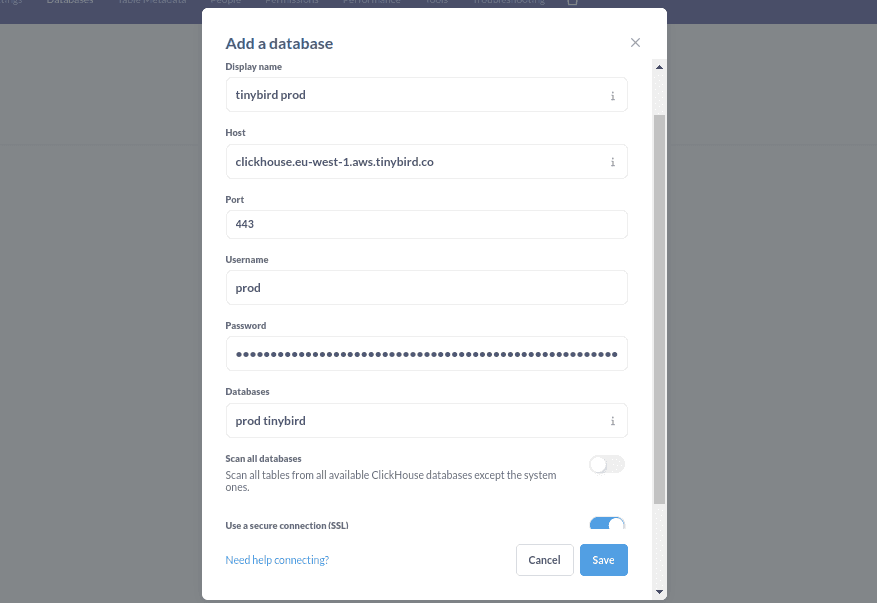
Configure the connection with these settings:
Display name: Tinybird Production  # Choose a descriptive name
Host: clickhouse.tinybird.co
Port: 443  # Use 443 for HTTPS
Databases: <WORKSPACE_NAME> tinybird organization  # Your workspace name and service datasources
See the list of ClickHouse® hosts to find the correct one for your region.
Authentication
Username: <WORKSPACE_NAME>  # not used for auth, helps you identify the connection
Password: <TOKEN>  # Your Tinybird Auth Token
Advanced options
Use a secure connection (SSL): enabled
- Save the database: Select Save to add the database to Metabase
Test the connection
Once configured, test your connection by creating a simple query:
- Select + New to create new SQL query
- Select your newly created database
- Write a simple query to test the connection
If the connection is working, you should see the result.