SaaS plan
The SaaS plan runs on shared infrastructure with a commitment. It starts at 4 vCPUs and uses a credit-based billing system with a minimum 12-month commitment. Billing uses active minutes, QPS overages, storage overages, and related SKUs. Storage included depends on plan size: 250 GB for plans smaller than S-16, and 1 TB for S-16 and larger. A support package is mandatory.
For plans on dedicated infrastructure with your own ClickHouse® cluster, see Enterprise. For shared infrastructure without a commitment, see Developer.
What's included
SaaS plan sizes start at 4 vCPUs. For available sizes and what's included in each, refer to your contract or contact sales.
Billing
SaaS plans are billed based on the following resources:
| Resource | Billing | Type |
|---|---|---|
| vCPUs | Number of vCPUs available. Starting at 4 vCPUs. Each vCPU size includes a number of active minutes. | Fixed. |
| Active minutes | An active minute is when any operation used a vCPU for a minute. See Active minutes. | Usage based. |
| Queries per second (QPS) | Queries per second, or QPS. Each vCPU size includes a QPS allowance. See Queries per second. | Usage based when usage exceeds the QPS included in the plan. |
| Storage | Average of daily maximum usage of the compressed disk storage of all your data, in gigabytes. | Usage based when usage exceeds the storage included in your plan. |
| Data transfer | When using Sinks, usage is billed depending on the destination, which can be the same cloud provider and region as your Tinybird cluster, or a different one. | Usage based. |
| Support | Standard or Premier support package as agreed in your contract. Standard is included. Premier pricing is defined in your agreement. | Fixed. |
| LLM usage | LLM usage in AI tools within MCP and Explorations UI. Includes $200 per billing cycle. | Usage based when usage exceeds the $200 included in the plan. |
The same QPS, active minutes, and storage overage rates apply in every region. See Pricing for current rates.
Active vCPU minutes / hours 
An active minute is any minute where at least one operation used a vCPU, regardless of actual vCPU time consumed during that minute. Whether you use 1 vCPU second or 60 vCPU seconds within a minute, it counts as 1 active minute. Multiple operations executed within the same minute still count as a single active minute. When using fractioned vCPUs, an active minute is proportional to the fraction. For example, 30 seconds of 0.5 vCPU.
Plan sizes include a number of active hours, calculated as active minutes divided by 60. If you consume all your active minutes, the overage is billed at a fixed rate per minute. Usage bursts allow you to temporarily exceed the vCPU usage limit. See vCPU burst mode.
Queries per second 
Queries per second, or QPS, is the number of queries per second that your plan includes. Calls to API endpoints and queries sent to the Query API count towards your QPS allowance. The limit excludes queries from the UI.
If you exceed the QPS allowance, the platform supports traffic peaks up to a ceiling of 4x the QPS included in your plan. Requests that exceed the allowance incur a fixed charge per request. Requests beyond the ceiling are rate limited. See QPS overages and QPS ceiling.
QPS overages and QPS ceiling 
Once you are over your plan's QPS allowance, you can keep making requests up to the plan's QPS ceiling of 4 times your plan's QPS. Requests that exceed the allowance incur a fixed charge per request. This applies to API endpoint and Query API requests.
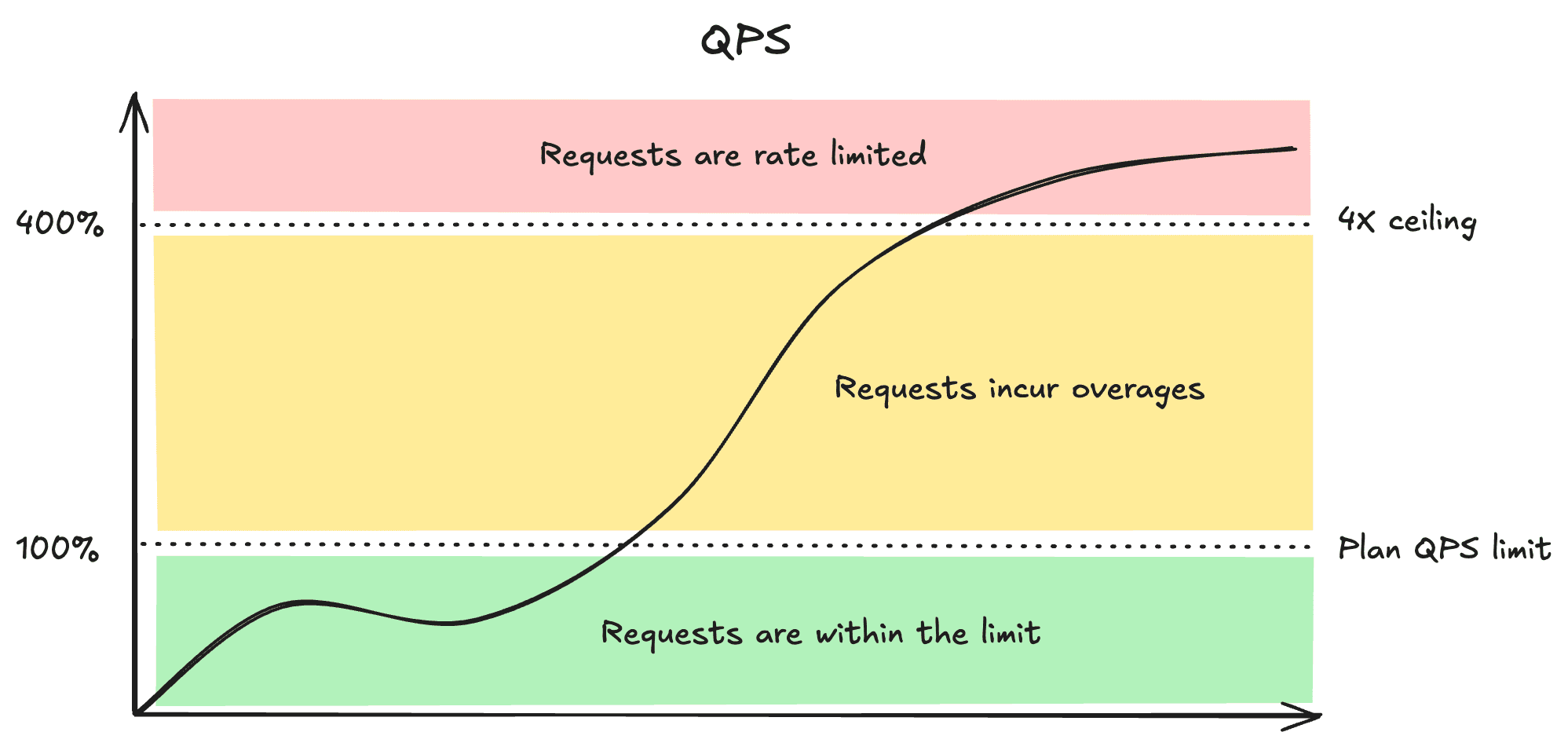
While your organization is temporarily limited due to vCPU usage over the vCPU burst capacity, you don't have access to the QPS ceiling of QPS allowance × 4. Request rates are limited to your QPS allowance.
vCPU burst mode 
You can't exceed the vCPU time limit indefinitely. The limit relates to vCPU time used during a minute. Tinybird allows usage bursts of 2x the vCPU time per minute. If you reach the vCPU limit, you can use the base QPS limit of your plan size during the next 5 minutes without QPS overages.
Max threads 
Max threads is the maximum number of concurrent threads used to execute queries in API Endpoints and Query API calls. Your SaaS plan's thread allowance determines this limit.
While more threads can improve concurrent query processing, final performance also depends on your vCPU limit and query complexity.
Fast API Endpoints can run with a single thread regardless of this limit. See Single-thread execution for fast Endpoints.
Data storage
You are charged for persistent data stored in ClickHouse® per Data Source. SaaS plans include 250 GB of storage for plans smaller than S-16, and 1 TB for S-16 and larger, as defined in your contract. Storage beyond the included amount is billed at a fixed rate per GB. Rates aren't tied to region.
Data transfer
The data transfer SKU covers data sent out of the platform, primarily through Sinks. Data transfer is charged per gigabyte. The rate depends on the transfer type. Intra transfers stay within the same cloud provider and region. Inter transfers cross providers or regions.
Support SKU
The Support SKU applies to SaaS plans. A support package is mandatory. Standard is included. Premier is available for SaaS S-24+. Support charges don't depend on ticket volume or platform activity. Premier pricing and final terms are defined in your customer agreement. See Support for details.
LLM usage 
LLM usage in AI tools within MCP and Explorations UI includes $200 of credits per billing cycle. Usage beyond included credits is billed at cost.
You can monitor usage through the tinybird.llm_usage Service Data Source.
Credits and billing cycle
SaaS plans are billed using credits. A credit is a unit of resource usage that can be consumed across Tinybird SKUs. The minimum commitment period is 12 months.
Bills are issued monthly based on credits consumed during the billing cycle (first to last day of the month). Invoices are issued when credits are purchased (for example, at contract signature or when buying additional credits).
Monitor usage and invoices
You can monitor credit consumption, remaining commitment, and infrastructure usage from your organization's dashboard. You can also review monthly usage receipts.
Support
A support package is mandatory on SaaS plans. Standard is included. Premier is available for SaaS S-24+. Premier pricing and final terms are defined in your customer agreement. See Support for full details.
Resize and manage
Resizing or making other changes to a SaaS plan requires contacting sales.
Next steps
- Developer plan: Shared infrastructure without a commitment.
- Enterprise plan: Dedicated ClickHouse® cluster with no resource sharing.
- Limits: Platform and operational limits.