



Tinybird Code is our AI-powered CLI that understands how to build Tinybird projects. Now we're sharing that knowledge with every AI coding agent.
We've packaged tinybird-best-practices as a structured skill that works with any Agent Skills compatible agent: Amp, Claude Code, Codex, Cursor, Gemini CLI, OpenCode, Windsurf, and more.
Install the skill and your agent automatically loads the relevant rules when it detects Tinybird files:
npx skills add tinybirdco/tinybird-agent-skills
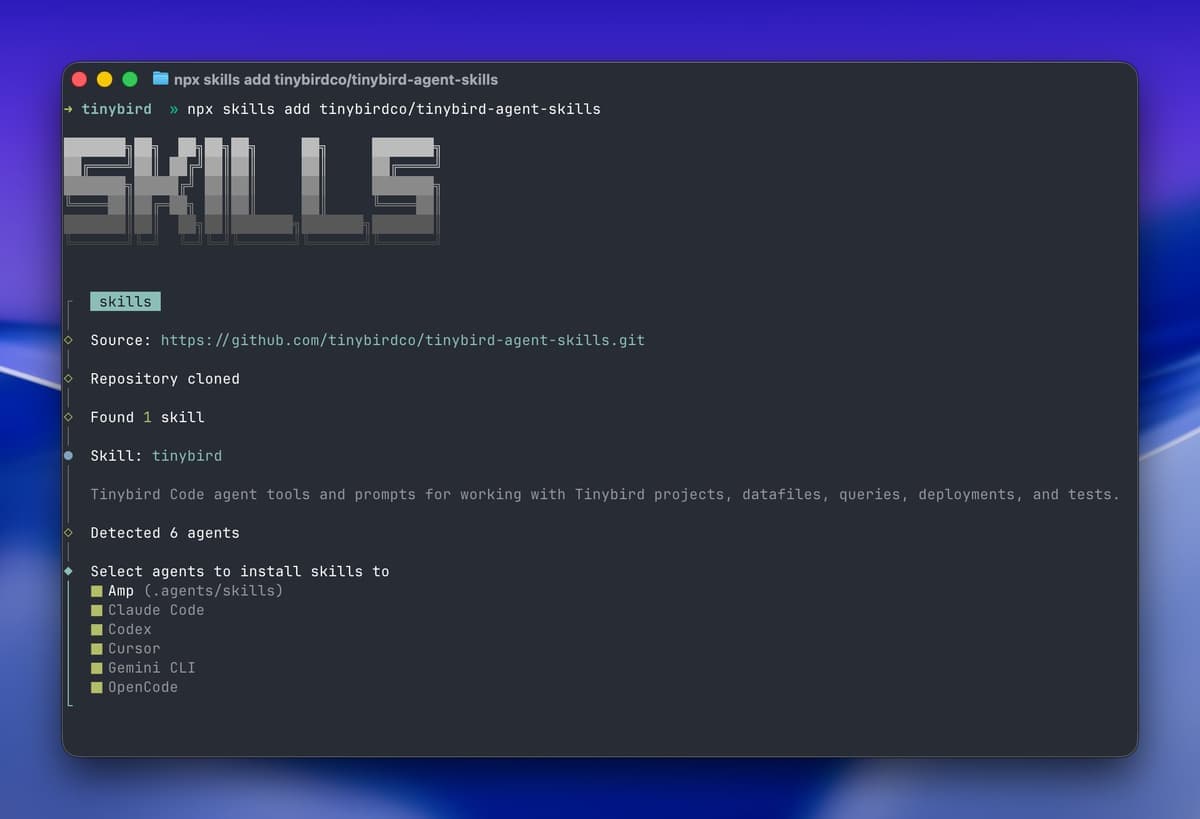
The skill covers the full Tinybird development lifecycle, from schema design and query optimization to testing and deployment. 20 rules that turn your agent into a Tinybird expert.
What's included
| Category | What it covers | Rule files |
|---|---|---|
| Project structure | File organization, CLI commands, local development | project-files.md, cli-commands.md, local-development.md |
| Datasources | Schema definitions, JSON paths, column types, ENGINE selection | datasource-files.md, connection-files.md |
| Pipes & Endpoints | Node structure, TYPE values, SQL templating, parameters | pipe-files.md, endpoint-files.md, sql.md |
| Materialized Views | State/Merge modifiers, AggregatingMergeTree, backfilling | materialized-files.md |
| Copy Pipes & Sinks | Snapshots, scheduling, deduplication, exports | copy-files.md, sink-files.md, deduplication-patterns.md |
| Data operations | Appending, replacing, mock data generation | append-data.md, data-operations.md, mock-data.md |
| Optimization | Sorting keys, read_bytes reduction, query tuning | endpoint-optimization.md |
| Testing & Deploy | Fixtures, build vs deploy, secrets, tokens | tests.md, build-deploy.md, secrets.md, tokens.md |
Examples
Each rule includes code examples. Here's a sample across different categories.
Defining a datasource schema
The agent uses JSON paths and sorting keys that match your query patterns:
SCHEMA >
    `user_id` String `json:$.user_id`,
    `event_type` LowCardinality(String) `json:$.event_type`,
    `timestamp` DateTime64(3) `json:$.timestamp`,
    `properties` String `json:$.properties`

ENGINE "MergeTree"
ENGINE_SORTING_KEY "user_id, timestamp"
Not column_name Type, but column_name Type json:$.path. The backticks, JSON paths, and sorting key order are all handled correctly.
Building an endpoint
The agent structures pipes with nodes and uses proper parameter syntax:
DESCRIPTION >
    Get events for a user within a date range

NODE filtered_events
SQL >
    %
    SELECT user_id, event_type, timestamp
    FROM events
    WHERE user_id = {{ String(user_id) }}
      AND timestamp >= {{ DateTime(start_date) }}
      AND timestamp < {{ DateTime(end_date) }}

NODE endpoint
SQL >
    SELECT event_type, count() as total
    FROM filtered_events
    GROUP BY event_type
    ORDER BY total DESC

TYPE ENDPOINT
The % enables templating. Parameters use {{ Type(name) }} syntax. Filters come early. The agent won't write CTEs, it uses nodes.
Creating a materialized view
The agent uses State modifiers and pairs them with the correct target schema:
DESCRIPTION >
    Daily event counts by user

NODE daily_counts
SQL >
    SELECT
        toStartOfDay(timestamp) as day,
        user_id,
        countState() as event_count
    FROM events
    GROUP BY day, user_id

TYPE MATERIALIZED
DATASOURCE daily_events_mv
countState(), not count(). The target datasource uses AggregateFunction(count, UInt64). The agent knows this pairing.
Before and after: agent output
Here's what changes when the skill is installed.
Prompt: "Create a datasource for tracking page views with user_id and timestamp"
Without skill:
SCHEMA >
    user_id String,
    timestamp DateTime,
    page_url String

ENGINE "MergeTree"
ENGINE_SORTING_KEY "timestamp"
With skill:
SCHEMA >
    `user_id` String `json:$.user_id`,
    `timestamp` DateTime64(3) `json:$.timestamp`,
    `page_url` String `json:$.page_url`

ENGINE "MergeTree"
ENGINE_SORTING_KEY "user_id, timestamp"
The skill-aware agent:
- Uses JSON paths for schema (required for Events API ingestion)
- Puts
user_idfirst in the sorting key (queries filter by user, not by time range) - Uses
DateTime64(3)for millisecond precision
The sorting key change alone can reduce read_bytes by 10x or more. Instead of scanning every row in a time range, ClickHouse® skips directly to the user's data.
Nodes instead of CTEs, filtering before JOINs
Without skill:
WITH filtered AS (
    SELECT * FROM orders
    JOIN customers ON orders.customer_id = customers.id
    WHERE customers.country = 'US'
)
SELECT product_id, sum(amount) FROM filtered GROUP BY product_id
With skill:
NODE us_customers
SQL >
    SELECT id FROM customers WHERE country = {{ String(country, 'US') }}

NODE filtered_orders
SQL >
    SELECT product_id, amount
    FROM orders
    WHERE customer_id IN (SELECT id FROM us_customers)

NODE endpoint
SQL >
    SELECT product_id, sum(amount) as total
    FROM filtered_orders
    GROUP BY product_id

TYPE ENDPOINT
The agent uses nodes instead of CTEs, filters before joining, and adds parameters for flexibility.
LowCardinality for repeated strings
Without skill:
SCHEMA >
    `status` String `json:$.status`,
    `country` String `json:$.country`,
    `event_type` String `json:$.event_type`
With skill:
SCHEMA >
    `status` LowCardinality(String) `json:$.status`,
    `country` LowCardinality(String) `json:$.country`,
    `event_type` LowCardinality(String) `json:$.event_type`
For columns with fewer than 10K unique values, LowCardinality provides ~10x compression and faster filtering.
Project structure
Without skill:
my-project/
  events.datasource
  get_events.pipe
  daily_stats.pipe
  events.ndjson
With skill:
my-project/
  datasources/
    events.datasource
  endpoints/
    get_events.pipe
  materializations/
    daily_stats.pipe
  fixtures/
    events.ndjson
The agent follows Tinybird conventions: datasources, endpoints, materializations, copies, and fixtures each have their own directory.
Where these rules come from
Real performance work on production codebases. The same patterns used by customers processing billions of rows at companies like Vercel and Canva. Schema decisions that cut query latency from seconds to milliseconds. Sorting key choices that skip most of the data. Materialized view patterns that don't break silently.
Every rule exists because someone hit the problem in production.
You're still in control
The skill provides guidance, not magic. The agent explains why it makes choices, and you can override anything.
$ This endpoint is slow, help me optimize it

Looking at your endpoint, I see a few issues:

1. Sorting key mismatch. Your queries filter by customer_id, but the
   sorting key is (timestamp, customer_id). This forces a full partition
   scan for every request. I'll swap the order to (customer_id, timestamp)
   so ClickHouse can skip irrelevant data.

2. Query-time deduplication on a large table. You're using FINAL on a
   500M row table. At this scale, Copy Pipes with periodic snapshots
   will perform better. I'll create an hourly snapshot and point your
   endpoint at that.

Want me to make these changes?
The agent tells you what's wrong and why the fix works. If you disagree, tell it. The rules are context, not commands.
What about Tinybird's other AI tools?
Tinybird offers several AI tools, each for a different workflow:
| Tool | What it does |
|---|---|
| Tinybird Code | AI-powered CLI. Run tb and describe what you want. |
| Agent Skills | The same knowledge, packaged for any agent. |
| MCP Server | Every workspace is a remote MCP server. Connect LLMs directly to your endpoints. |
| Explorations | Conversational UI to explore your data without writing SQL. |
Tinybird Code is the AI ClickHouse expert. It knows how to build real-time projects with Tinybird, but it runs in the Tinybird CLI.
Agent Skills bring that expertise to your current agent and workflow. Whether you're in Claude Code, Cursor, Windsurf, or another tool, the skills teach your agent how Tinybird projects work.
How to use
Install the skill in your agent:
npx skills add tinybirdco/tinybird-agent-skills
The skill is just markdown files, no runtime dependencies, no performance impact. Your agent loads the relevant rules based on context. Editing a .datasource file? It gets datasource and schema rules. Optimizing an endpoint? It gets SQL and optimization rules.
Try these prompts:
- "Create a datasource for user events with deduplication"
- "This endpoint is slow, why?"
- "Set up a materialized view for daily aggregations"
- "Add a Copy Pipe to snapshot this table hourly"
Questions? Join the Tinybird Slack community.
Found a new pattern? Open a PR on the GitHub repo. Just submit your rule and we'll review it.

