Shared infrastructure
Plans on shared infrastructure run on clusters where resources are shared with other customers. Tinybird offers the Free, Developer, and SaaS plans on shared infrastructure.
For plans on dedicated infrastructure (your own ClickHouse® cluster), see Dedicated infrastructure.
All plan features, resources, and limits are applied at the organization level and shared across all workspaces within your organization.
Plan sizes
Free plan
A single tier with no size selection. Provides a production-grade instance of Tinybird including ingest connectors, real-time querying, and managed endpoints.
| Resource | Included |
|---|---|
| vCPU | 0.25 vCPU (burst 3x) |
| Storage | 10 GB |
| Max threads | 1 |
| LLM credits | $25 per billing cycle |
See Free plan limits for full limits. Support is available through the Community Slack.
Developer plan
You choose a plan size when signing up or upgrading/downgrading; each size has a fixed set of included resources. Supports up to 8 vCPUs. Includes 25 GB of storage; usage beyond included amounts is billed as overage.
SaaS plan
Runs on shared infrastructure and starts at 4 vCPUs. Follows the same limit model as Developer (vCPU overages, storage overages). Minimum storage is 1 TB; the support package is mandatory. Billed using credits.
SKUs and overages
The following describes how usage is billed on shared infrastructure. Each Developer and SaaS plan includes a bundle of resources (vCPU, storage); usage beyond those amounts is charged as overages at fixed prices that are not tied to region.
vCPU seconds
Each plan includes a number of vCPU seconds to consume per second. When you consume more seconds, additional usage incurs vCPU overages (see vCPU overages below), charged at a fixed rate per second. Overage rates are not tied to region.
vCPU overages
Each plan will include a baseline vCPU allocation. For example, if your plan includes 1 vCPU, you will be able to consume 1 vCPU second per second without overage.
Usage above your plan allocation will count as vCPU overage and will be billed accordingly. This calculation will include both read and write operations.
On-demand CPUs
The On-demand CPUs SKU covers the cost of temporary compute capacity provisioned on demand for jobs that need dedicated compute instances—for example, populate jobs that run outside the baseline shared resources and use short-lived, single-host instances for the duration of the job. Billing is based on CPU and the duration of on-demand usage.
Data Storage
You are charged for data stored in the platform (persistent data in ClickHouse® per Data Source). Each plan includes a certain amount of storage at no extra cost (10 GB on Free, 25 GB on Developer, and a minimum on SaaS). Storage beyond the included amount is billed at a fixed rate per GB; rates are not tied to region.
Data Transfer
The Data transfer SKU covers the cost of data sent out of the platform, primarily through Sinks that export data to external storage. You are charged per gigabyte transferred. The rate depends on whether the transfer stays within the same cloud provider and region (intra) or goes across different providers or regions (inter).
QPS overages
Each SaaS plan has a QPS limit (queries per second). Queries above that limit, up to your plan's ceiling, are QPS overages and are charged at a fixed rate per request. Overage rates are not tied to region. See QPS Overages and QPS Ceiling.
Support
The Support SKU applies to SaaS plans only. Support is offered in tiers (for example, Standard and Premier), defined in your contract. The applicable tier and price depend on your agreement and are not usage-based—charges do not depend on ticket volume or platform activity. Billing is typically a percentage of your total contracted credits, as agreed in your commercial terms.
Key concepts
The following concepts apply to the Free, Developer, and SaaS plans.
Active vCPU minutes / hours
Developer plans bill vCPU usage using active minutes. An active minute is any minute where at least one operation used a vCPU, regardless of actual vCPU time consumed during that minute. Whether you use 1 vCPU second or 60 vCPU seconds within a minute, it counts as 1 active minute. Multiple operations executed within the same minute still count as a single active minute. When using fractioned vCPUs, an active minute is proportional to the fraction; for example, 30 seconds of 0.5 vCPU.
Plan sizes come with a number of active hours, which is the number of active minutes you can use divided by 60. If you consume all your active minutes, the overage is billed at a fixed rate per minute. Usage bursts allow you to temporarily exceed the vCPU usage limit. See vCPU burst mode.
Queries per second
Queries per second (QPS) is the number of queries per second that your plan includes. Calls to API endpoints and queries sent to the Query API count towards your QPS allowance. Queries made from the UI are excluded from the limit.
Plan sizes come with a number of included QPS, which is the maximum number of queries per second that your plan allows without incurring additional costs. If you are in a paid plan and you exceed the QPS allowance, the platform will support the traffic peaks (up to a ceiling of 4x the QPS included in your plan) but the requests above the QPS allowance will be subject to additional costs at a fixed rate per request. If you go beyond that plan's ceiling, you will be rate limited for those requests. See QPS Overages and QPS Ceiling.
You'll receive emails alerting you about QPS overages as well as when the accumulated overage costs go beyond 20% of your plan's fixed fee. If your consumption grows and upgrading to the next plan would be cheaper, you'll also receive an email with the recommendation.
vCPU burst mode
This mode allows you to temporarily exceed your vCPU limit. If you temporarily exceed your limits, you won't be billed and you'll receive an email alerting you of the situation and suggesting increasing your plan size.
Your operations can take x2 vCPU time per minute allowed in your plan for real-time operations. For batch operations, like populates or copies, the whole operation is allowed to run until it reaches a platform limit, like maximum available memory.
For example, for a populate that needs 180 seconds of CPU time in a minute, if you are on a Developer Plan S-1 where operations are allowed to run up to 120 seconds per minute, the operation will finish and the limit won't be triggered.
Max threads 
Max threads refers to the maximum number of concurrent threads that can be used to execute queries in API Endpoints and Query API calls. Each thread represents a separate processing unit that can handle part of a query independently.
Having more threads available means your queries can be processed with higher parallelism, potentially improving overall query performance when dealing with multiple concurrent requests. The number of max threads available depends on your plan:
- Free plan: Limited to 1 thread
- Developer and SaaS plans: Limited by the threads included in your plan
- Enterprise dedicated plans: Limited by the underlying infrastructure
While more threads can improve concurrent query processing, the final performance also depends on factors like your vCPU limit and the complexity of your queries.
LLM usage 
Large Language Model (LLM) usage in AI tools within MCP and Explorations UI is billed as a dedicated SKU:
| Plan | Included LLM credits per billing cycle | Billing behavior |
|---|---|---|
| Free | $25 | Hard limit: LLM requests stop when included credits are exhausted. |
| Developer | $100 | Usage beyond included credits is billed at cost. |
| SaaS | $200 | Usage beyond included credits is billed at cost. |
You can monitor usage through the tinybird.llm_usage Service Data Source.
QPS Overages and QPS Ceiling
deprecated
¶Once you are over your plan's QPS allowance, you can keep making requests up to 4 times your plan's QPS (the plan's QPS ceiling), and those requests above the allowance are subject to additional costs at a fixed rate per request. This applies to API endpoint and Query API requests.
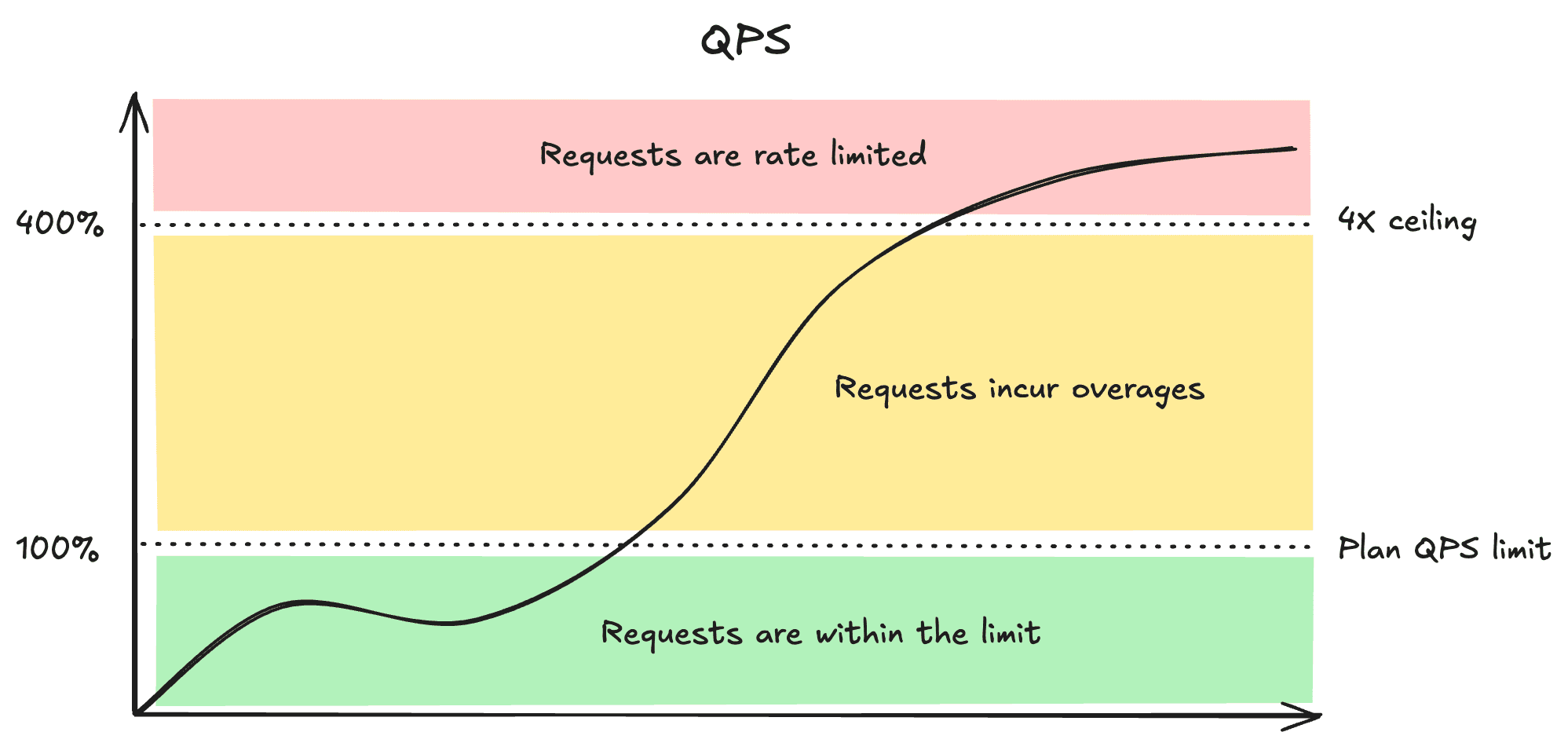
Example:
- You are in an S-1/4 Developer plan, which includes 10 QPS.
- Your project is growing and you get a sudden traffic peak of 20 QPS for a short period (120 seconds).
- You are under your plan's ceiling (in this case 40), so you're not rate limited.
- There have been 10 (20 minus 10) requests over your plan's allowance for 120 seconds, which equals 1,200 requests over QPS included in your plan that will be billed at a small fixed rate per request in the next bill.
- You can stay in your current plan.
You keep growing during the next weeks:
- You start to have a pretty regular use of ~40 QPS.
- Requests over 40 QPS (the plan's ceiling) will be rate-limited.
- After some days, you receive an email about QPS Overages and current overage costs, with a plan recommendation.
- You can upgrade to a higher Developer plan that includes 40 QPS (or whatever you need), and from that instant, your traffic falls within the new plan's ceiling.
While your org is temporarily limited due to vCPU high usage (over vCPU burst capacity) you won't have access to QPS Ceiling (QPS Allowance x4) and you will be rate-limited to your QPS allowance.
QPS burst mode for Free plan
deprecated
¶Your operations, while on the Free plan, can take x2 QPS per second for API endpoint requests or SQL queries.
To better understand how burst mode works, consider the following:
- Your free plan allows 10 queries per second as the normal rate (leak rate).
- You have a burst capacity of 20 QPS, meaning you can temporarily handle up to 20 queries per second for short bursts.
- Each second, your bucket can "leak" 10 queries and can temporarily hold more if needed.
Here's how burst mode works in practice:
- If you send 15 queries in one second, 10 are processed at the normal rate and 5 use burst capacity.
- If you send 25 queries in one second, 10 are processed at normal rate, 10 use burst capacity, and 5 are rejected (over the 20 QPS burst limit).
- The burst capacity "leaks" back to normal levels at a rate of 10 QPS, meaning after a burst, your capacity gradually returns to the standard rate.
The leaking mechanism ensures you can handle occasional traffic spikes while maintaining overall performance and preventing system overload.
For example, if you use your full burst capacity of 20 QPS, it takes about 1 second of processing at the normal 10 QPS rate before you can burst again. This helps balance flexibility for traffic spikes with consistent system performance.
Next steps
- Free plan — What's included and how to upgrade.
- Developer plan — Plan sizes, resize, and downgrade.
- SaaS plan — Shared infrastructure with 4+ vCPUs.
- Limits — Limits per plan type.