



Wrapped features are everywhere. What started with Spotify has become a year-end staple; GitHub does it, Strava does it, even your bank probably does it now. Yet despite their popularity, there's surprisingly little written about the engineering behind them. How do you efficiently aggregate a full year of data? How do you collect data from multi-region deployments? How do you make it secure and performant?
We built Tinybird Wrapped using... Tinybird! This post is a deep dive into everything:
- the multi-region data architecture
- the lambda pattern for combining real-time and historical data
- the endpoint design
- JWT-based security
- how to not leak internal user ids
- even the Next.js frontend
If you've ever wondered what it takes to build a Wrapped feature at scale — hundreds of billions of rows, petabytes of data, subsecond responses — this is for you.
What's Tinybird Wrapped
Let's start by the output.
We essentially created a yearly recap feature that shows our customers their usage statistics. Think Spotify Wrapped but for real-time analytics infrastructure.
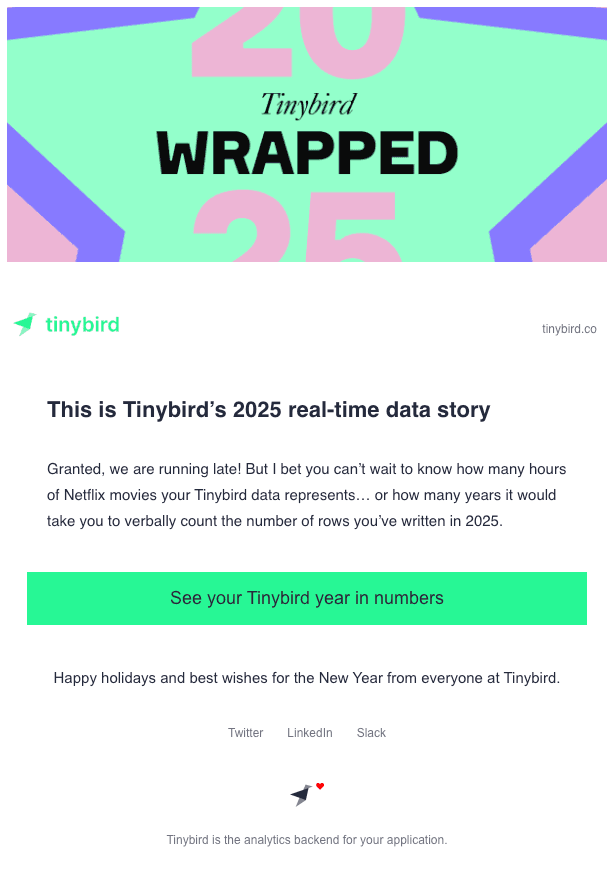
We sent an e-mail like this to our customers including a link to their Tinybird usage metrics for 2025.
And this is an example of what our customers could see (data is from one of our internal organizations).
This is how we built it.
Data Architecture Overview
For those who don’t know, Tinybird is a managed ClickHouse® fork with the best developer experience in the industry.
Our users real-time data projects live in workspaces. A workspace is a ClickHouse database behind an API to simplify management.
Workspaces are grouped logically into organizations for billing purposes and customers can create organizations in multiple Tinybird regions.
Users in an organization connect their data streams to data sources (ClickHouse tables on steroids) and publish analytical SQL queries as API endpoints to build real-time applications (amongst other use cases).
- customer (user)
  - region(s)
    - organization(s)
      - workspace(s) (ClickHouse DB)
        - data source(s) (table on steroids) / pipe(s)

Now the interesting part: every time a user sends a request to a Tinybird API we log it (in our Tinybird instance).
Logging everything is necessary for billing, infrastructure monitoring and operational analytics. It also makes it possible for us to expose raw logs and metrics to our customers so they can monitor their own usage, track errors, or debug requests.
Luckily, this also lets us build a "year in review" for each user.
How we log everything
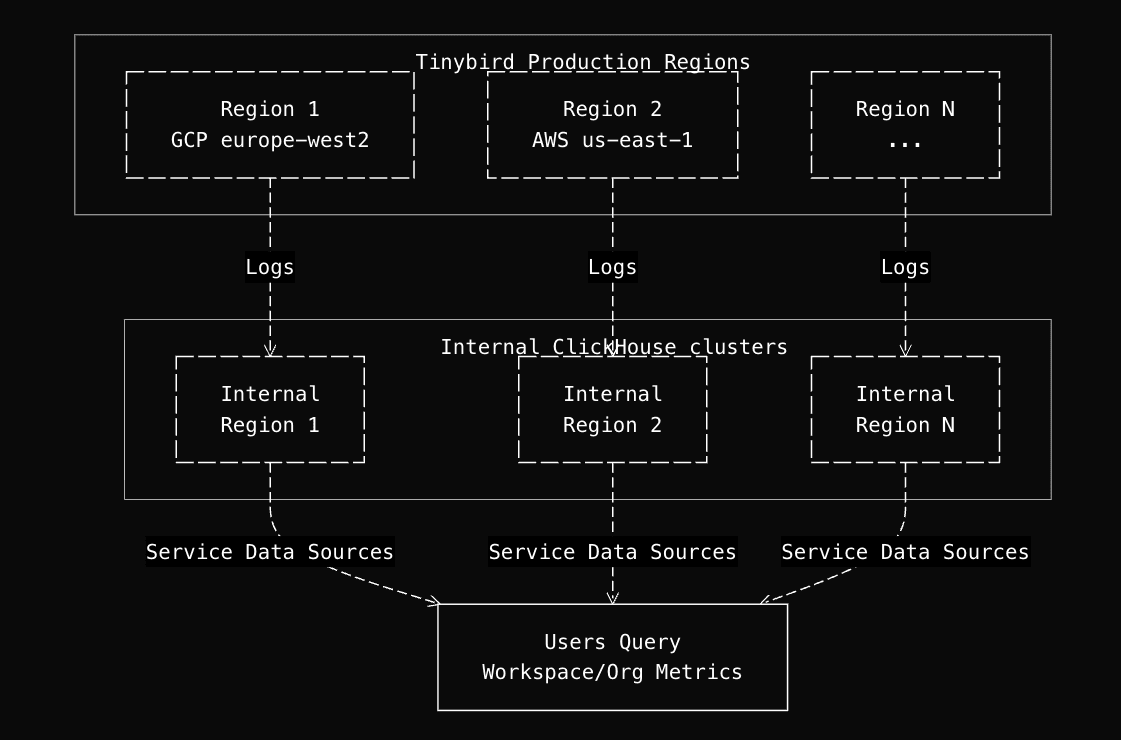
Each Tinybird region has instrumented services that log:
- API request metrics
- Ingestion metrics
- Storage metrics
- Performance metrics (spans, query metrics, etc.)
- And more...
As part of each region deployment we have an Internal workspace (database) where we ingest the logs and metrics from instrumented services in that region.
We use our Internal workspaces just like our customers use their workspaces - to serve several real-time analytics use cases.
For instance, we expose data sources and views to users via Service Data Sources. Customers can query these to monitor their own workspace and organization metrics at different granularity levels: workspace, organization, datasource, pipe, etc.
S3 as the Interoperability Layer
This multi-region architecture does not allow querying all the operational metrics at once. To aggregate operational metrics from all production regions, we have a centralized workspace called oa_sot in one of the regions.
Operational analytics are aggregated by organization (a set of a customer ClickHouse databases in a region). The key concept is that organization_id is the primary key (one per region per customer).
We collect metrics for each organization in oa_sot for a number of internal use cases, like in this case to build Tinybird Wrapped.
The interesting part is how we collect data. In legacy systems you'd use some sort of orchestrator (Airflow, Luigi or similar), which allows you to write ETLs in your preferred programming language and then schedule them to move data from one place to another.
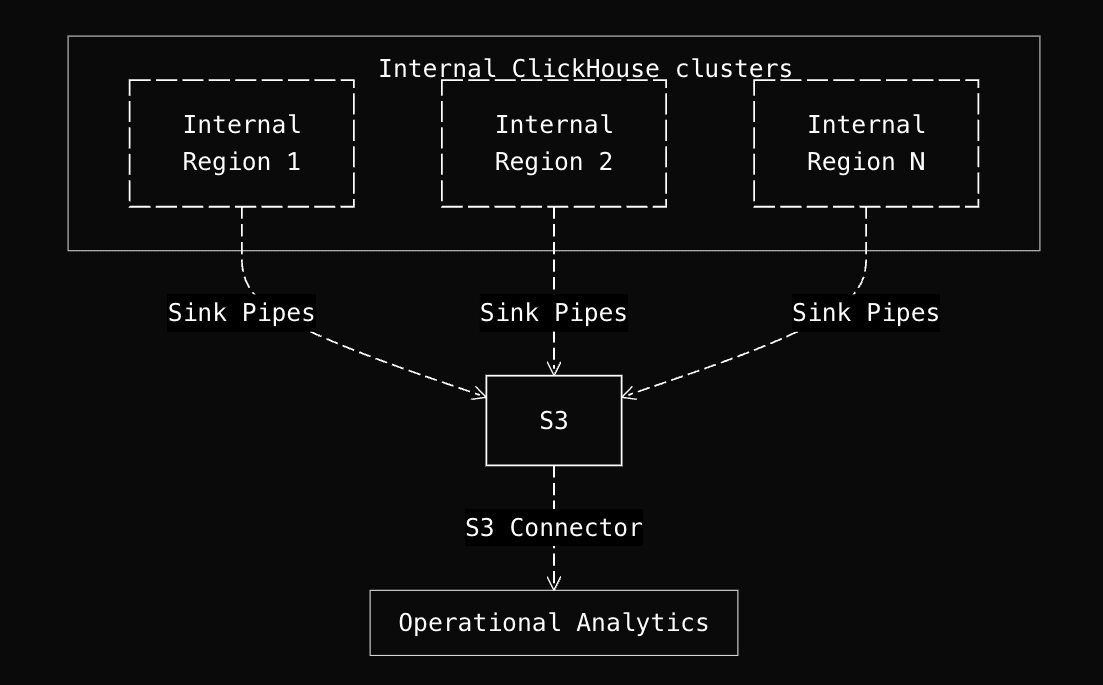
We collect data in a much simpler way and with no operational overhead by just using S3 + Parquet as the data interoperability layer and the built-in export/import connectors in Tinybird.
The data flow is: Production Regions → Internal Workspaces → (Export) Sink Pipes → S3 → Auto-import via S3 Connections → oa_sot
Data Collection Process
Sink pipes in Internal workspaces extract the last 30 minutes of data every 10 minutes and write it to an S3 bucket as Parquet files. The sink pipes add region and organization_id.
Landing datasources in oa_sot use S3 connections with IMPORT_SCHEDULE @auto, which means Tinybird automatically detects new files in S3 and imports them. No manual triggers are needed for main operational metrics.
The Lambda Architecture: Deduplication at scale
Gathering data from multiple regions presents two problems:
- Scalability: We are in the order of hundreds of billions of rows and queries need to respond in real-time
- Duplication: When you ingest data in batches, you need to make sure they do not overlap. Also given the nature of this data, reconciliation processes may be needed, so deduplication is mandatory.
This can be solved with a lambda architecture, the data flow is as follows:
Landing tables: Metrics from each region in Internal Workspaces land in
ReplacingMergeTreetables, one for each type of metric (API requests, storage, ingestion, etc.). These tables allow for deduplication by unique key, which is essential since export jobs may overlap and we need to reconcile late arriving data. However,ReplacingMergeTreerequiresFINALqueries which don't scale at query time.Raw tables: Copy pipes run every 30 minutes to deduplicate each landing table into
MergeTreetables (we call them "raw" tables). Copy pipes implement a grace period strategy, they re-process a 6-hour window of recent data on each run to catch late arriving records while avoiding duplicates. These raw tables are permanently deduplicated with sorting keys optimized for query patterns, making them fast to query directly without needingFINAL.Materialized Views: Materialized Views aggregate raw data by hour, day, week, and month using a multi-level hierarchy. Each level uses aggregation state functions (like
sumMergeState()) that enable efficient rollups without re-scanning underlying raw data. This means querying a year's worth of monthly data is fast because we're only reading pre-computed aggregates, not billions of raw rows.

This architecture is known as a lambda architecture in which you have in one hand aggregated historical data at different granularity levels which is populated in batches and then fresh data with duplicates. At query time you deduplicate the fresh data (which is small data) and union with the historical data which since it's aggregated is also small data.
That way you can scale analytics making sure data is fresh and with no duplicates. Materialized views are essential for year-long aggregations. Without them, queries would be prohibitively slow or expensive.
To learn more about implementing lambda architectures in Tinybird, see our lambda architecture guide.
Tinybird Wrapped Implementation
With this data architecture, which we already had in place, it was time to build the specific queries and endpoints for the Tinybird Wrapped of each of our customers.
We made a rough draft of the metrics and structure of the slides. If we were able to build an HTTP endpoint with the data from our Operational Analytics workspace in a couple of hours then we'll move on with the implementation of the web application.
The Wrapped Endpoint
We prototyped an endpoint with Tinybird Code that gave us all the summarized metrics we needed, we just had to ask iteratively what we needed and validated the results with a couple of customer organizations.
In case you are curious on how to use the agent, this is the full Tinybird Code session
There was a short session on December 12th where we fully prototyped the endpoint and then two shorter sessions a week later right when we were integrating it into the final application.
The endpoint joins historical pre-aggregated monthly data from January to November with fresher daily data being updated regularly for December, since the month wasn't over yet. Users coud see their metrics being updated until the last day of the year.
Example query pattern:
SELECT sum(request_sum) as total_requests
FROM (
    SELECT sumMerge(request_sum) as request_sum
    FROM mv_pipe_stats_daily
    WHERE timestamp >= '2025-12-01' AND timestamp <= '2025-12-31'
      AND organization_id IN (SELECT arrayJoin(organization_ids) FROM organization_lookup)
    GROUP BY pipe_name
    UNION ALL
    SELECT sum(request_sum) as request_sum
    FROM historic_monthly_pipe_stats
    WHERE organization_id IN (SELECT arrayJoin(organization_ids) FROM organization_lookup)
    GROUP BY pipe_name
)
We calculated these metrics for each organization:
- Total requests, errors, bytes read, rows read
- Peak request day and count
- Storage: total bytes/rows, largest datasource
- Ingestion: total bytes/rows, top 3 event types
- Top workspaces: read and write percentages
This is the final endpoint SQL that returned all the metrics above
Privacy and Security
To avoid publicly exposing our customers organization_ids, we created a wrapped_organizations datasource that maps internal organization_id to public-safe wrapped_ids.
This is a common pattern in multi-tenant user facing analytics.
Also given that customers can have multiple organizations, by mapping them to a unique wrapped_id, it enables multi-region metrics aggregation.
SCHEMA >
    `organization_id` String,
    `wrapped_id` String, -- Public-safe identifier
    `created_at` DateTime

ENGINE "MergeTree"
ENGINE_SORTING_KEY "organization_id"
That way the endpoint we created for Tinybird Wrapped (wrapped_pipe_stats_summary) can be requested by passing a parameter wrapped_id. The query first maps to the organization_ids and filters all subqueries by them:
NODE organization_lookup
SQL >
    %
    SELECT groupUniqArray(organization_id) as organization_ids
    FROM wrapped_organizations
    WHERE wrapped_id IN splitByChar(',', {{ String(wrapped_id) }})

...
WHERE
  organization_id IN (SELECT arrayJoin(organization_ids) FROM organization_lookup)
...
The wrapped_id can be passed as a parameter to the wrapped_pipe_stats_summary API endpoint:
https://api.tinybird.co/v0/pipes/wrapped_pipe_stats_summary.json?wrapped_id=...&token=...
or in our case we generated one JWT token for each customer with this payload:
{
  "workspace_id": "{workspace_id}",
  "name": "wrapped_{normalized_name}",
  "exp": 1965536234,
  "company_name": "Tinybird",
  "normalized_company_name": "Tinybird",
  "url_key": "tinybird-71865",
  "scopes": [
    {
      "type": "PIPES:READ",
      "resource": "wrapped_pipe_stats_summary",
      "fixed_params": {
        "wrapped_id": "647e57b2-6123-4853-8595-9f733f24d60b,3e053cc6-0239-4e39-a997-75176193140c,..."
      }
    }
  ],
  "limits": {
    "rps": 100
  },
  "short_url": "https://tbrd.co/wrapped-tinybird-71865"
}
The JWT also includes some metadata (useful for the frontend) and limits such as requests per second (rps), enforced by the API.
The Tinybird API honors JWT scopes, so each request to the endpoint is automatically authorized, including the organization filter (fixed_params) in the final query to ClickHouse, so that customers can only access their own data.
Frontend Application
The frontend is a Next.js 16+ application built with TypeScript, Tailwind CSS, and React hooks for state management.
We wanted to create something visually striking and engaging. This meant using vibrant colors and smooth, sophisticated animations powered by GSAP to make the data presentation feel dynamic and polished.

We built a custom animation system where each slide defines its own entering and exiting transitions, with context-aware animations that vary based on the source and destination slide. This allows for complex, multiphase animations bars growing vertically then expanding horizontally, diagonal lines rotating and expanding from center, rectangles growing from corners, all coordinated through GSAP timelines with proper sequencing and z-index management.
We use a dynamic route pattern: /wrapped/[url_key] where url_key is a public-safe identifier mapped to an organization. The flow:
- User visits
/wrapped/[url_key] - Frontend calls
/api/organization?url_key=...to get org metadata - Frontend calls
/api/stats?url_key=...to get metrics - Displays slideshow of metrics with animated transitions
JWT Token Management
As we've seen, we created a JWT token for each tenant that has scopes for the stats endpoint filtered by their organizations. The JWT token can be revoked any time and it includes rate limiting.
Tinybird APIs process the JWT token and grant access to the corresponding resources, with the given filters and respecting the rate limits.
The frontend never exposes tokens directly, API routes act as a proxy where /api/stats looks up the token by url_key.
Tokens can be stored in sessionStorage (client-side, temporary) for direct Tinybird API calls if needed, but are cleared on session end.
Slides UI
Each slide features animated number counters that rapidly cycle through random values before settling on the final metric, adding visual interest to what could otherwise be static numbers. Navigation supports keyboard (arrow keys), touch gestures (tap left/right halves on mobile), and on-screen controls.
To make large numbers relatable, we implemented a comparison system that selects the most impactful comparison based on priority and value proximity to a readable range (1-1000).
Results and Impact
While we can't share specific customer numbers, the Wrapped feature successfully aggregated data across:
- Multiple regions (GCP, AWS)
- Hundreds of organizations
- Billions of requests processed
- Petabytes of data analyzed
Achieving subsecond query responses for optimal web app performance and providing the necessary security mechanisms via JWT tokens.
Conclusion
We built Tinybird Wrapped using only Tinybird. We leveraged materialized views for efficient year-long queries, implemented multi-region support for accurate metrics, and designed a privacy-first approach with public-safe identifiers and JWT.
This project demonstrates a pattern we see in many of our users: once you have a huge amount of data, Tinybird makes it easy to exploit through fast queries, endpoints, and connections to other tools so new use cases emerge organically.
Tinybird Wrapped is a perfect example of this: we had all the operational data we needed, and building a yearly recap feature was just a matter of writing a few queries and creating a simple frontend with visually appealing animations. The infrastructure was already there, turning what could have been a complex project into something we could build in a couple of days.
If you're interested in building your own wrapped (or similar analytical feature), follow our example and try Tinybird for free.
If you're interested in joining our team and working on projects like this, check out our careers page and apply.


